Choosing a CA is a security decision
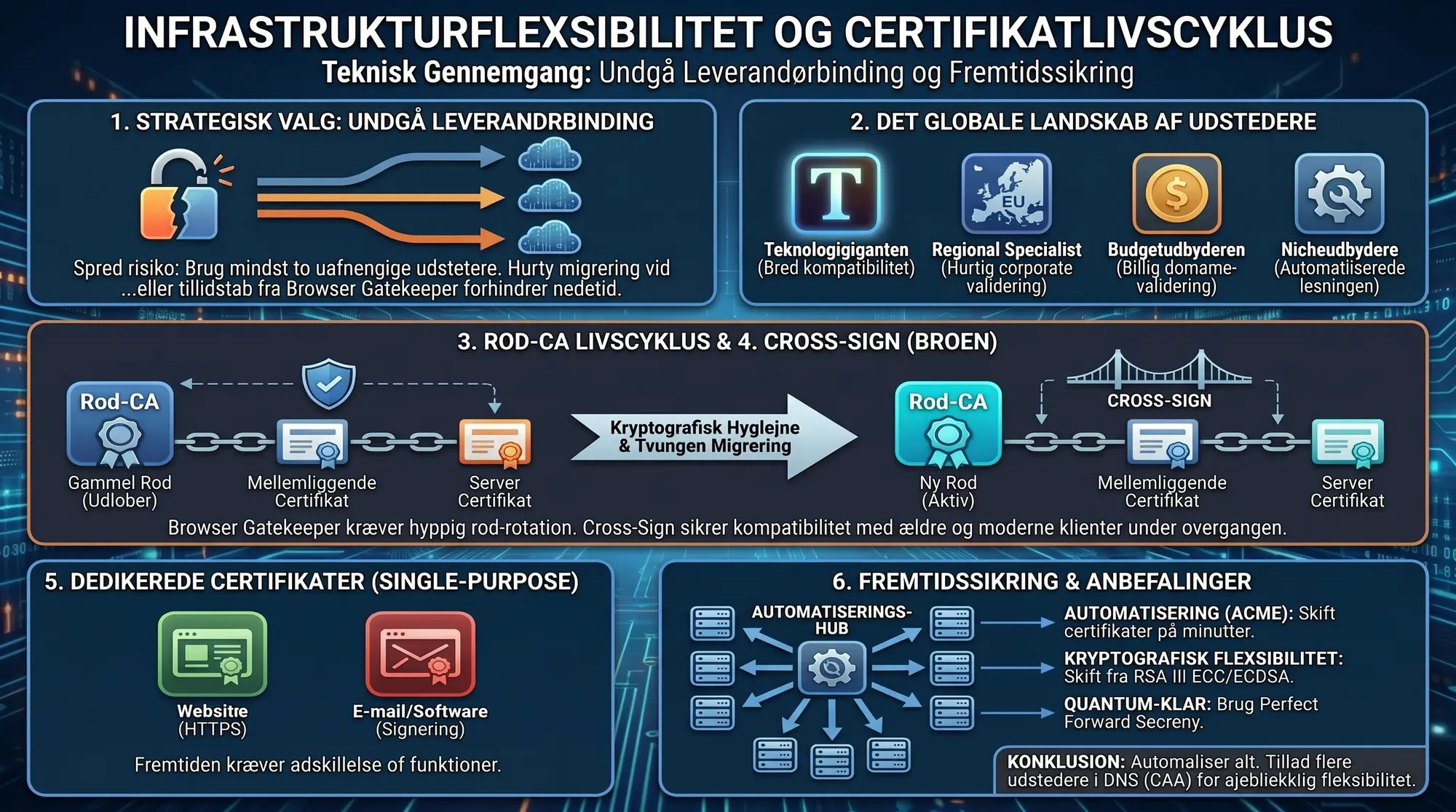
Most administrators choose a certificate authority (CA) based on price or habit. This is a mistake. Your choice of CA dictates how widely your certificate is recognised, how quickly you can react if your CA loses browser trust, and which certificate types you can access.
The Entrust incident in 2024, where Google Chrome removed trust for the Entrust CA, demonstrated the consequences: thousands of organisations had to find a new CA. Those who already provisioned certificates from multiple CAs managed the transition smoothly. The rest paid the price in overtime and downtime.
The current CA landscape
There are only a handful of relevant commercial CAs on the market:
- DigiCert (incl. RapidSSL, GeoTrust, Thawte): World's largest commercial CA. Most widely distributed root certificate. Predominantly western customer base across USA and Europe. Owns the former Symantec CA brands, now all issued from DigiCert's infrastructure.
- GlobalSign (incl. AlphaSSL): International CA with a predominantly western customer base in the USA and Europe, supplemented by Japan. AlphaSSL is their discount brand, recently switched to the newer G3 root certificate. May require a cross-signed intermediate for older devices.
- Sectigo (formerly Comodo): Cheapest of the major CAs. Large market share in the DV segment. Predominantly western customer base, concentrated around American domains. Frequently uses cross-signed intermediates. OV/EV validation relies heavily on Dun & Bradstreet, making the process nearly impossible in the Nordics, where D&B coverage is limited.
- Certum: Polish CA (Asseco Data Systems). Own branded certificates predominantly cover the Polish market. CT log analysis shows that roughly 80% of certificates under Certum's roots are issued through white-label solutions by third parties, with Chinese operators accounting for a significant share. A notable portion of OV/EV certificates are issued to entities in Iran and Nigeria, a different trust profile than the western CAs.
- Buypass: Norwegian CA. Customer base almost exclusively on the Norwegian market. Has shut down their SSL business. All existing customers must migrate.
- Google Trust Services: Google's own CA. Issues exclusively free DV certificates via ACME. Offers neither OV nor EV.
CA profile and market position data as of March 2026.
Root certificate lifecycles
All public SSL certificates chain up to a root certificate that is pre-installed in operating systems and browsers. The age and distribution of the root certificate determine how widely your certificate is recognised.
Root certificates have a limited lifespan. Mozilla has formalised this in their Root CA Lifecycle policy, which sets limits on how long key material in a root CA can be used. This is a matter of cryptographic hygiene: the longer a private key is in use, the greater the accumulated risk. See also Mozilla's overview of all CA root certificate lifecycles.
Mozilla, Apple, Google, and Microsoft each maintain their own trust store with individual requirements for inclusion and phase-out. When a root expires or is removed, all certificates in that certificate chain stop working.
The forced migration from legacy roots
All major CAs are in the middle of a forced migration away from their older, widely distributed root certificates. Mozilla's Root CA Lifecycle policy dictates that key material in a root certificate must not be older than 15 years from the date the key was created (not from the certificate's issuance date) for TLS, and 18 years for S/MIME. The date is determined by the audited key ceremony report, or for older roots (prior to July 2012) by the certificate's "Valid From" date. Once the limit is reached, Mozilla removes the root from their trust store, and certificates issued from that root stop working in Firefox.
CAs cannot renew their old roots or extend their lifespan. They must generate entirely new key pairs, undergo an audited key ceremony, and apply for inclusion in all four major trust stores (Mozilla, Apple, Google, Microsoft) from scratch. Mozilla recommends that CAs apply for inclusion of their next root at least 2 years before the old root is distrusted. It takes time to achieve distribution to all devices via OS and browser updates. There are indications that Google Chrome eventually wants a more frequent rotation than 15 years, possibly down to 5 years, but this is not yet a formal requirement.
With roots that are over 20 years old, several have already been removed and more are on the way out. Roots from before 2006 are already distrusted by Mozilla (April 2025), and the next in line are roots from 2008-2012. The result is that legacy roots, which are pre-installed on practically all devices, are gradually disappearing and being replaced by newer roots with a shorter history and lower compatibility with older systems. Cross-signing is used as a bridge during the transition period, but it adds complexity to the certificate chain. See Mozilla's full distrust schedule for all CAs.
From now until mid-2029, several CAs must retire their most relied-upon legacy roots which have provided near-universal compatibility for years. Every time a root is retired, customers with older devices lose compatibility, and the CA must prove that their new root is equally reliable. This marks a turbulent period for the industry.
Cryptographic expiry vs browser distrust
When a root is retired, it is important to distinguish between two dates: the certificate expiry date (hardcoded in the certificate, typically 20-30 years in the future) and the browser distrust date (the day browsers remove the root from their trust store via a software update). Today, roots rarely survive to their actual expiry date. The browsers retire them first.
| CA | Root | Key | Type | Phase-out | Notes |
|---|---|---|---|---|---|
| No longer in use (2024-2026) | |||||
| DigiCert | Global Root CA | ~2004 | Multi | Apr 2025 | Incl. Assured ID and High Assurance EV |
| GlobalSign | Root R1 | ~2003 | Multi | Apr 2025 | Oldest GlobalSign root |
| Sectigo | AAA Certificate Services | ~2004 | Multi | Apr 2025 | Former Comodo root |
| Certum | Certum CA | ~2002 | Multi | 2025 | Already retired |
| Sectigo | COMODO RSA CA | ~2010 | Multi | Jun 2025 | Switched to R46/E46 |
| Sectigo | USERTrust RSA / ECC | ~2010 | Multi | Jun 2025 | Switched to R46/E46 |
| Certum | Certum Trusted Network CA | ~2008 | Multi | Sep 2025 | Switched to Certum Trusted Root CA / EC-384 CA |
| Entrust | All public roots | Various | Multi | Nov 2024 | Permanently distrusted, sold to Sectigo |
| To be phased out during 2026-2029 | |||||
| DigiCert | Global Root G2 | ~2013 | Multi | May 2026 | Switching to dedicated TLS intermediates. |
| Let's Encrypt | ISRG Root X1 (RSA) | 2015 | Multi | May 2026 | Replaced by Gen Y 13 May 2026 |
| Let's Encrypt | ISRG Root X2 (ECC P-384) | 2020 | Multi | May 2026 | Replaced by Gen Y 13 May 2026 |
| GlobalSign | Root R3 | ~2009 | Multi | Jul 2026 | TLS issuance stopped. |
| GlobalSign | Root R5 (ECC P-384) | ~2012 | Multi | Jul 2026 | TLS issuance stopped. Continues for non-TLS. |
| New TLS-dedicated CAs (2025-2026) | |||||
| DigiCert | G5 RSA + G5 ECC | ~2021 | TLS | — | Widely distributed. Good compatibility. |
| GlobalSign | Root R46 (RSA) + E46 (ECC) | ~2019 | TLS | — | AlphaSSL already switched. GlobalSign brand 27 July 2026. |
| Sectigo | Public Server Auth R46 + E46 | 2021 | TLS | — | EV Apr, OV May, DV Jun 2025. Limited distribution on older devices. |
| Certum | Trusted Root CA + EC-384 CA | ~2017 | TLS | Sep 2025 | Trust until 2032/2033. From Android 14+. |
| Let's Encrypt | ISRG Root YR + YE (Gen Y) | Sep 2025 | TLS | — | Awaiting trust stores. Cross-signed via X1/X2. |
| Google Trust Services | GTS Root R1 | ~2016 | TLS | — | Added to root stores in late 2018. |
Sources: Mozilla CA Root Lifecycles, GlobalSign Upcoming Changes, DigiCert Hierarchy Transition, Sectigo Root Migration, Certum New Root CAs, Let's Encrypt Certificates, Google Trust Services Repository, Chrome Root Program Term Limit
The next generation of root certificates from all CAs follows the same pattern: dedicated single-purpose roots. Where legacy roots were multi-purpose (TLS, Code Signing, S/MIME, Client Auth from the same root), the new roots are strictly limited to TLS Server Authentication. This means that EKU Client Authentication is removed from all new certificates.
Which generation a CA currently operates on is largely a matter of timing. DigiCert has roughly 2 years more remaining on their G2 root than GlobalSign had on R3. This is not a technical merit; it is simply the random timing of when the keys were generated. AlphaSSL (GlobalSign) has already migrated to the new roots, which required a cross-signed intermediate certificate to function in certain clients. Sectigo has almost always utilised cross-signing (including for their former AddTrust CA), making the transition less visible.
Intermediate certificates, cross-signing and new requirements
Between the root certificate and your server certificate sits one or more intermediate certificates. All CAs rotate intermediate certificates continuously, and they will be required to do so more frequently in the future.
The CA/Browser Forum has introduced requirements that intermediate certificates must be dedicated to a single purpose. An intermediate certificate that issues DV certificates must not also issue OV certificates. The new dedicated TLS roots (such as GlobalSign's R46/E46) are also restricted exclusively to Server Authentication. EKU Client Authentication and other purposes are removed, meaning certificates issued from these roots can only be used for TLS server authentication. See our article on EKU Client Authentication for details regarding this change.
When a CA changes its root certificate, they typically issue cross-signed intermediate certificates as extra chain certificates. The server includes them in the TLS handshake so older clients can build a certificate chain to the legacy root certificate, while modern clients use the new root. On Windows, it is nearly impossible to force the certificate chain in the correct direction via the trust store because it requires the legacy root certificate to be disabled first.
The modern certificate chain is short: server certificate → Intermediate CA G3 → Root CA G3.
With cross-signing, the server sends an extended certificate chain: server certificate → Intermediate CA G3 → Cross-signed Intermediate G2 → Root CA G2. A client with the G3 root in its trust store stops at Intermediate G3 and ignores the rest. A client that only has the G2 root follows the full certificate chain down to Root CA G2.
The extra cross-signed intermediate certificate does not only provide benefits. It increases the number of bytes sent in every TLS handshake, which adds milliseconds for those counting them. Furthermore, on servers that do not handle it correctly, such as Windows, it can cause issues with certificate chain selection because the trust store attempts to build the shortest chain itself.
Outdated intermediate certificates cause errors
Many administrators are accustomed to intermediate certificates lasting for years and often reuse certificate chain files from previous installations. This approach no longer works. CAs rotate intermediate certificates more frequently, and if the server sends an outdated certificate chain, the TLS connection fails. Chrome automatically fetches missing intermediate certificates via AIA (Authority Information Access), so Chrome users rarely notice. This is somewhat paradoxical: Google argues that CRL and OCSP lookups are too slow and privacy-invasive for the browser to perform, and therefore ignores them entirely. However, Chrome readily fetches missing certificate chain components because that is the part users complain about. Security (revocation checks) is skipped because it might "delay" page rendering. Firefox, older mobile browsers, and many API clients do not fetch missing intermediate certificates. They simply fail.
A well-known example: Sectigo's legacy AddTrust External CA Root expired in May 2020 and caused widespread issues because many servers still sent the outdated AddTrust certificate chain instead of the new USERTrust root.
A more recent example: in June 2025, Sectigo changed the intermediate certificate on their PositiveSSL products from the well-established USERTrust RSA root to the new Sectigo Public Server Authentication Root R46 (key from 2021). Windows servers automatically built the certificate chain to the new root, which was not yet distributed in all trust stores, and IIS installations failed. We managed to get the change postponed for our customers, but from June 2026 it can no longer be delayed, and Sectigo customers will experience a major shift in which root chain their certificates utilise.
The solution is straightforward: always fetch the current certificate chain from the CA's documentation during every installation and reissuance. Do not reuse old certificate chain files.
The move to dedicated TLS root certificates affects all three CAs we sell from, and it is the single change that currently costs the most work on Windows Server. The dates per CA, what a cross-signed certificate does, and what you need to do as a customer are collected in The industry is moving to dedicated TLS root certificates.
What is CA flexibility?
CA flexibility means that your infrastructure is not dependent on a single certificate authority. If your CA loses browser trust, is acquired by a competitor, changes its pricing model, or simply cannot deliver fast enough, you can switch without redesigning your workflow.
In practical terms, this requires:
- Access to more than one CA. Maintain agreements with at least two CAs so you can switch without initiating a procurement process under time pressure.
- The ability to quickly switch all certificates. With ACME automation and ARI (ACME Renewal Information), your client can automatically detect when a certificate should be renewed early, for example during a CA switch or a revocation event. Without automation, switching CAs is a manual project that takes weeks.
- Flexible key sizes. It should be straightforward to change key type and size in your configuration. RSA 2048 is the weakest key strength still used for SSL and is already restricted for S/MIME and Code Signing, where certificates must remain valid for several years.
| Key | Type | Compatibility | Strength | Speed | Recommendation |
|---|---|---|---|---|---|
| rsa2048 | RSA 2048-bit | 100% | 40% | ~1,500 sign/s | Legacy systems only |
| rsa3072 | RSA 3072-bit | 100% | 60% | ~500 sign/s | Recommended RSA minimum |
| rsa4096 | RSA 4096-bit | 95% | 80% | ~150 sign/s | Sensitive systems only |
| prime256v1 | ECC 256-bit | 99% | 60% | ~40,000 sign/s | Fast and compatible |
| secp384r1 | ECC 384-bit | 99% | 100% | ~10,000 sign/s | Recommended and secure |
ECDSA private keys are significantly faster during the TLS handshake than RSA. This is particularly relevant for servers handling many concurrent connections. The minimum key strength should be RSA 3072 or ECDSA P-256.
Quantum computing and certificate keys
On a correctly configured server, the certificate's private key is only used for authentication during the TLS handshake. When the server uses ECDHE or DHE key exchange (which all modern TLS 1.2 and TLS 1.3 configurations do), a unique session key is generated for each connection via Perfect Forward Secrecy (PFS). The actual data encryption is handled by these ephemeral session keys via cipher suites such as AES-256-GCM, not by the certificate's private key.
This means that the "save now, decrypt later" scenario, where an attacker captures encrypted traffic today and decrypts it with a future quantum computer, is not affected by the certificate's key strength. The session keys are unique per connection and cease to exist after the session ends. However, this assumes that the server does not allow legacy cipher suites without PFS (e.g., TLS_RSA_WITH_AES_256_CBC_SHA), where the certificate's private key is used directly for key exchange. With such ciphers enabled, all captured traffic is at risk the day the key can be broken.
The real concern with quantum computing is real-time attacks: when the first state actors gain the capacity to break certificate keys, they can potentially execute invisible man-in-the-middle attacks against sensitive systems by generating fake certificates or simply impersonating a genuine certificate in real-time. For such systems, it makes sense to use key strengths that take longer to break. When the first quantum computers can break RSA 2048, it will likely take 1-3 years before RSA 4096 can also be broken. The actual computation per key will probably take hours to days, so the absolute time per key is not the deciding factor. It is the overall transition period where stronger keys are not yet vulnerable.
It is therefore at least as important to ensure that the server only offers modern cipher suites. Disable all ciphers without PFS, all CBC-mode ciphers, and anything below TLS 1.2. Use IIS Crypto on Windows or the Mozilla SSL Configuration Generator to configure this correctly. TLS 1.3 exclusively supports PFS-based cipher suites and is the most secure choice.
- No CA-specific dependencies in the code. Hardcoded intermediate certificates, pinning to specific issuers (HPKP), or CA-specific API integrations make you vulnerable.
- CAA records that allow multiple CAs. If your DNS only permits one CA via CAA records, you cannot switch quickly. Add all the CAs you potentially want to use. See our guide to CAA records.
Why one CA is not enough
Beyond the Entrust incident, we have seen several examples of CAs suddenly failing to deliver:
- Symantec 2017: Google removed trust for all Symantec certificates (incl. GeoTrust, Thawte, RapidSSL). DigiCert took over the business, but all existing certificates required reissuance.
- StartCom/WoSign 2016: Both CAs were removed from trust stores following systematic abuse.
- GlobalSign OCSP outage 2016: GlobalSign erroneously issued OCSP responses that marked everything as revoked. The responses were cached by browsers and CDNs, leaving many sites with GlobalSign certificates inaccessible for days. Customers who had an alternative CA were able to switch. The rest waited.
- GlobalSign intermediate error 2020: A technical error in GlobalSign's intermediate CAs led to the revocation of thousands of certificates.
- Buypass 2025: The Norwegian CA stopped issuing SSL certificates. Customers who exclusively used Buypass had to find a new CA under severe time pressure.
No CA is immune to problems. The question is not if it happens, but when. It makes sense to be able to switch CAs, or better yet: already have a connection to more than one.
CA strengths and weaknesses
The three major CAs have different focus areas:
- DigiCert has focused on technical solutions and platform integrations. They currently possess the most compatible root certificate. On the downside, their pricing increases annually, and customer service in Europe is not always their strong suit.
- GlobalSign has maintained a focus on OV/EV solutions with straightforward validation, especially in Europe and Scandinavia. We perform OV validation on behalf of GlobalSign in Danish and Swedish, usually within an hour.
- Sectigo is clearly the cheapest option for DV certificates. OV/EV validation for Scandinavian companies is an entirely different story: it always requires direct contact with Sectigo's support and preferably verification via Dun & Bradstreet. It is not a fast process. We have chosen to remove Sectigo OV/EV products from our portfolio for this reason.
Until GlobalSign changed the root certificate for AlphaSSL, we recommended AlphaSSL for its combination of price and browser compatibility. Following the shift to G3 and the compatibility issues it introduced, RapidSSL and Thawte 123 are now the cheapest alternatives offering broad compatibility.
All CA root certificates have fixed expiry dates, and they are already planning the next generation. Our recommendations will shift in tandem with these changes over the coming years, as we can already see that several root certificates are scheduled for replacement.
The FairSSL approach
We sell certificates from three independent CAs: DigiCert, GlobalSign, and Sectigo. This is not a coincidence. We are not owned by or tied to any single CA. We recommend the product that best fits the task, regardless of the brand.
Hosting providers and IT consultants who resell certificates should maintain agreements with at least two CAs. This reduces exposure during CA outages and provides customers with a genuine backup plan.
Recommendations
- Use at least two CAs in production.
- Automate issuance and installation using ACME, making a CA switch trivial.
- Check your CAA records and ensure that all relevant CAs are permitted.
- Avoid pinning certificates to specific CAs in code or configuration.
- Monitor CA news. Follow Google and Mozilla trust store updates. That is where problems surface first.