
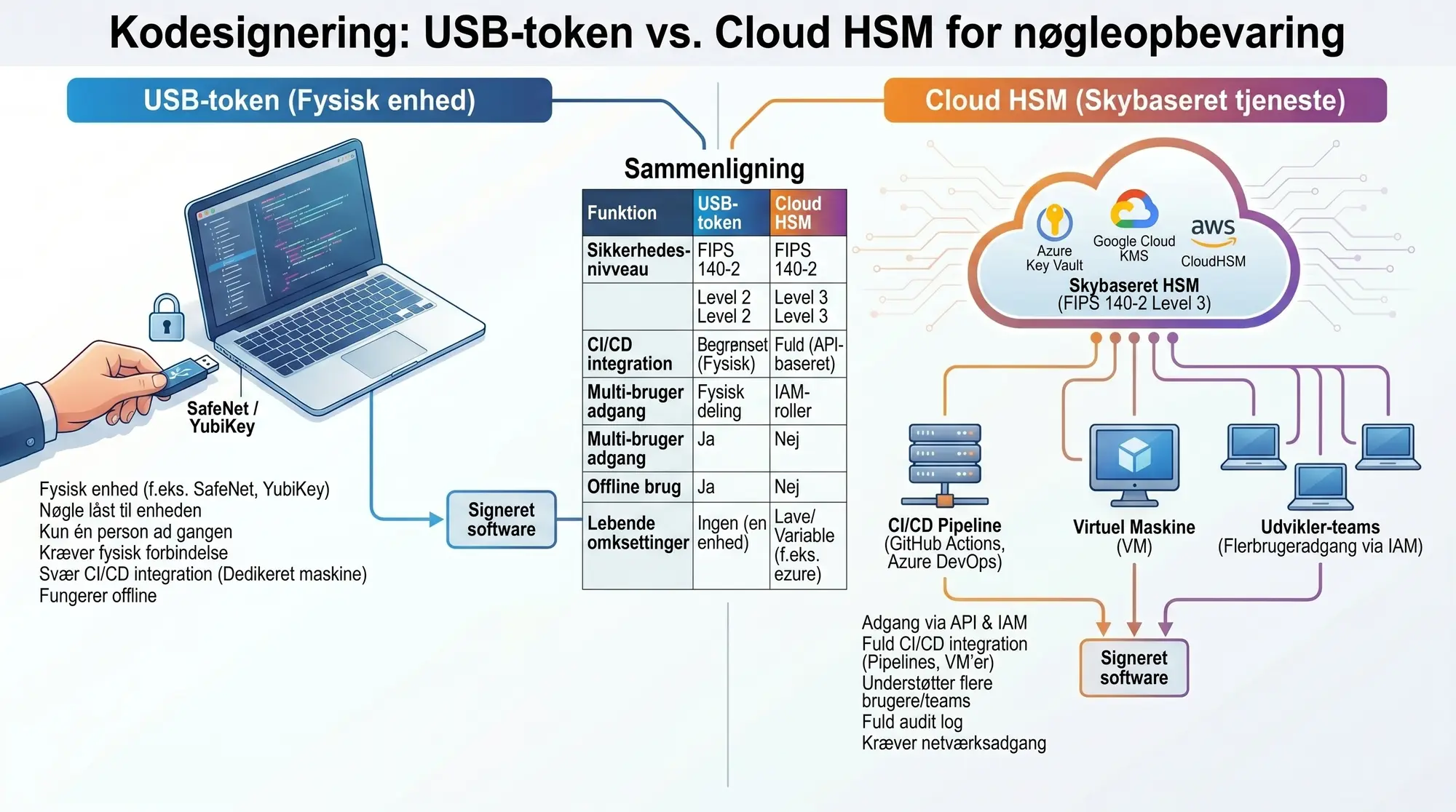
Two paths to secure key storage
Since 1 June 2023, the CA/Browser Forum requires all Code Signing certificates (both OV and EV) to store the private key on certified hardware: either a physical USB token (FIPS 140-2 Level 2 or CC EAL 4+) or a cloud-based HSM.
The choice between USB token and cloud HSM depends on your workflow, your team, and your security requirements. Both approaches meet the CA/Browser Forum requirements. The difference is in practical use.
USB tokens
A USB token is a physical crypto device, typically a Thales SafeNet 5110 CC or a YubiKey 5, that stores the private key in a secure chip. The key cannot be copied out of the device. Signing happens directly on the token.
Advantages:
- Simple setup. Plug in the USB, install the driver, sign.
- No ongoing costs beyond the token itself (typically included in the certificate price).
- Full control. The key is physically in your possession.
- Works offline. No dependency on cloud services.
Disadvantages:
- Only one person can sign at a time (the device must be physically connected).
- Difficult to integrate into CI/CD pipelines. Requires a dedicated build machine with the token permanently connected.
- Risk of loss or damage. If the token is lost, the certificate must be reissued with a new token.
- SafeNet software blocks signing over RDP (Remote Desktop). TeamViewer works, however. The device must be directly physically connected to the machine (either physical OS or passthrough to a virtual machine).
- Scales poorly. If multiple teams need to sign, you can purchase additional USB devices and reissue copies of the certificate to them.
Cloud HSM
Cloud HSM solutions such as Azure Key Vault Premium, Google Cloud KMS, and AWS CloudHSM store the key in a FIPS 140-2 Level 3 certified HSM in the cloud. Signing happens via API calls. Azure Key Vault Premium is the most widely used solution for remote access and pipeline signing. Google Cloud KMS supports CNG/PKCS#11. AWS CloudHSM is more expensive and mostly relevant if you already have an HSM device there.
Advantages:
- Full CI/CD integration. Signing commands can run in pipelines without physical hardware.
- Access control via IAM. Multiple users and services can sign with role-based access.
- Audit trail. All signings are logged.
- No risk of physical loss. The cloud provider handles backup and redundancy.
- Higher security level (FIPS 140-2 Level 3 vs Level 2 for most USB tokens).
Disadvantages:
- Ongoing costs. Azure Key Vault Premium costs approximately $5/key/month plus per operation. AWS CloudHSM is significantly more expensive (approximately $1.40/hour per HSM cluster).
- More complex setup. Requires a cloud account, IAM configuration, and integration with signing tools.
- Dependency on the cloud provider. If Azure/AWS has downtime, you cannot sign.
- Requires network access. Does not work offline.
Comparison
| Property | USB token | Cloud HSM |
|---|---|---|
| Security level | FIPS 140-2 Level 2 | FIPS 140-2 Level 3 |
| CI/CD integration | Limited (requires physical connection) | Full (API-based) |
| Initial cost | Included in certificate price | Cloud account + setup |
| Ongoing cost | None | Azure Key Vault Premium approx. EUR 66/year incl. 500,000 signings |
| Multi-user access | Physical sharing of device | IAM roles |
| Backup/redundancy | No (loss = reissuance) | Automatic |
| Offline use | Yes | No |
| Audit trail | Limited | Full cloud logging |
| Key size | Typically RSA 2048/3072 | RSA 2048-4096, ECDSA P-256/P-384 |
CI/CD and automation
For teams with automated build pipelines, cloud HSM is the obvious choice. You can sign in GitHub Actions, Azure DevOps, GitLab CI, or Jenkins without connecting physical hardware.
Typical workflow with Azure Key Vault:
- CI/CD pipeline builds the software.
- Pipeline calls
signtool(Windows) orjSign(cross-platform) with a reference to the Key Vault key. - Signing happens via the Azure API. The private key never leaves the HSM.
- Signed binary is published.
With a USB token, you need a dedicated build agent (physical or VM with USB passthrough) that always has the token connected. It works, but scales poorly and introduces a single point of failure.
In short
USB token is simple and inexpensive for manual releases. Cloud HSM is necessary for CI/CD and distributed teams. Most start with a USB token and switch to Cloud HSM when they automate.
When to choose what?
Choose USB token if:
- You sign manually and infrequently (e.g. monthly releases).
- You have one development team in one location.
- You want to minimise ongoing costs.
- You need to sign offline.
Choose cloud HSM if:
- You have a CI/CD pipeline that needs to sign automatically.
- Multiple teams or locations need to be able to sign.
- You need an audit trail and access control.
- You already use Azure, AWS, or Google Cloud.
Get started
We have detailed setup guides for all three major cloud platforms:
Need help choosing the right solution? Contact us. We provide no-obligation advice.